
The HTML style attribute is used to add styles to an element, such as color, font, size, and more.
<!DOCTYPE html>
<html>
	<body>
		<p>I am normal</p>
		<p style="color:green;">I am green</p>
		<p style="color:violet;">I am violet</p>
		<p style="font-size:60px;">I am big</p>
	</body>
</html>
Output:

The HTML Style Attribute
Setting the style of an HTML element, can be done with the style attribute.
The HTML style attribute has the following syntax:
<tagname style="property-name:value;">Background Color
The CSS background-color property defines the background color for an HTML element.
Example
Set the background color for a page to powderblue:
<!DOCTYPE html>
<html>
	<body style="background-color:powderblue;">
		<h1>This is a heading</h1>
		<p>This is a paragraph.</p>
	</body>
</html>
Output:

Example
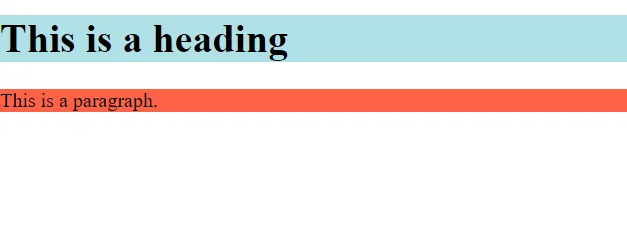
Set background color for two different elements:
<!DOCTYPE html>
<html>
	<body>
		<h1 style="background-color:powderblue;">This is a heading</h1>
		<p style="background-color:tomato;">This is a paragraph.</p>
	</body>
</html>
Output:
Text Color
The CSS color property defines the text color for an HTML element:
<!DOCTYPE html>
<html>
	<body>
		<h1 style="color:blue;">This is a heading</h1>
		<p style="color:red;">This is a paragraph.</p>
	</body>
</html>
Output:

Fonts
The CSS font-family property defines the font to be used for an HTML element:
<!DOCTYPE html>
<html>
	<body>
		<h1 style="font-family:verdana;">This is a heading</h1>
		<p style="font-family:courier;">This is a paragraph.</p>
	</body>
</html>
Output:

Text Size
The CSS font-size property defines the text size for an HTML element:
<!DOCTYPE html>
<html>
	<body>
		<h1 style="font-size:300%;">This is a heading</h1>
		<p style="font-size:160%;">This is a paragraph.</p>
	</body>
</html>
Output:

Text Alignment
The CSS text-align property defines the horizontal text alignment for an HTML element:
<!DOCTYPE html>
<html>
	<body>
		<h1 style="text-align:center;">Centered Heading</h1>
		<p style="text-align:center;">Centered paragraph.</p>
	</body>
</html>
Output:
