HTML contains several elements for defining user input and computer code.
HTML Computer Code Elements
| Tag | Description |
|---|---|
<code> |
Defines programming code |
<kbd> |
Defines keyboard input |
<samp> |
Defines computer output |
<var> |
Defines a variable |
<pre> |
Defines preformatted text |
HTML <code> For Keyboard Input
The HTML <code> element is used to define a piece of computer code. The content inside is displayed in the browser's default monospace font.
Example:
<!DOCTYPE html>
<html>
	<body>
		<h2>Computer Code</h2>
		<p>This is a programming code:</p>
		<code>
			x = 5;
			y = 6;
			z = x + y;
		</code>
	</body>
</html>
Output:
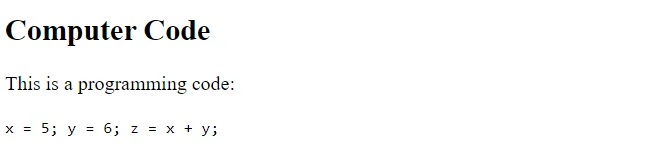
Notice that the <code> element does not preserve extra whitespace and line-breaks.
To fix this, you can put the <code> element inside a <pre> element:
<pre>
<code>
	x = 5;
	y = 6;
	z = x + y;
</code>
</pre>
HTML <kbd> For Keyboard Input
The HTML <kbd> element is used to define keyboard input. The content inside is displayed in the browser's default monospace font.
Example:
<!DOCTYPE html>
<html>
	<body>
		<h2>The kbd Element</h2>
		<kbd>This is how  content written within kbd element looks like.</kbd></p>
	</body>
</html>
Output:

HTML <samp> For Program Output
The HTML <samp> element is used to define sample output from a computer program. The content inside is displayed in the browser's default monospace font.
Example:
<!DOCTYPE html>
<html>
	<body>
		<h2>The samp Element</h2>
		<samp>This is how the content within samp element looks like. </samp>
	</body>
</html>
Output:

HTML <var> For Variables
The HTML <var> element is used to define a variable in programming or in a mathematical expression. The content inside is typically displayed in italic.
Example:
<!DOCTYPE html>
<html>
	<body>
		<h2>The var Element</h2>
		<var>E</var> = <var>mc</var><sup>2</sup>
	</body>
</html>
Output:

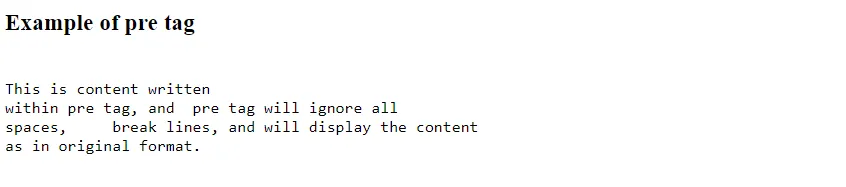
HTML <pre> element
The <pre> element defines preformatted text, which displays the content within it in a fixed-width font. It keeps the content into its original format and ignores all formatting.
<!DOCTYPE html>
<html>
	<body>
		<h3>Example of pre tag</h3>
		<pre>
This is content written
within pre tag, and  pre tag will ignore all
spaces,     break lines, and will display the content
as in original format.
		</pre>
	</body>
</html>
Output: