
CSS selectors are used to select the content you want to style. Selectors are the part of CSS rule set.
CSS selectors select HTML elements according to its id, class, type, attribute etc.
CSS Selectors
CSS selectors are used to "find" (or select) the HTML elements you want to style.
We can divide CSS selectors into five categories:
- CSS Element Selector
- CSS Id Selector
- CSS Class Selector
- CSS Universal Selector
- CSS Group Selector
This page will explain the most basic CSS selectors.
1. The CSS element Selector
The element selector selects HTML elements based on the element name.
Example: all <p> elements on the page will be center-aligned, with a red text color:
<!DOCTYPE html>
<html>
	<head>
		<style>
			p {
				text-align:  center;
				color:  red;
			}
		</style>
	</head>
	<body>
		<p>This is a paragraph</p>
		<p id="elem1">Me too!</p>
		<p>And me too!</p>
	</body>
</html>
Output:

2. The CSS id Selector
The id selector uses the id attribute of an HTML element to select a specific element.
The id of an element is unique within a page, so the id selector is used to select one unique element!
To select an element with a specific id, write a hash (#) character, followed by the id of the element.
Example: the CSS rule below will be applied to the HTML element with id="elem1":
<!DOCTYPE html>
<html>
	<head>
		<style>
				text-align:  center;
				color:  red;
			}
		</style>
	</head>
	<body>
		<p>This is a paragraph</p>
		<p id="elem1">Me too!</p>
		<p>And me too!</p>
	</body>
</html>
Output:

3. The CSS class Selector
The class selector selects HTML elements with a specific class attribute.
To select elements with a specific class, write a period (.) character, followed by the class name.
Example:
<!DOCTYPE html>
<html>
	<head>
		<style>
			.center {
			    text-align: center;
			    color: red;
			}
		</style>
	</head>
	<body>
		<h1 class="center">This heading is red and center-aligned.</h1>
		<p class="center">This paragraph is red and center-aligned.</p>
	</body>
</html>
Output:

If you want to specify that only one specific HTML element should be affected then you should use the element name with class selector.
<!DOCTYPE html>
<html>
	<head>
		<style>
			p.center {
			    text-align: center;
			    color: red;
			}
		</style>
	</head>
	<body>
		<h1 class="center">This heading is not affected</h1>
		<p class="center">This paragraph is blue and center-aligned.</p>
	</body>
</html>
Output:

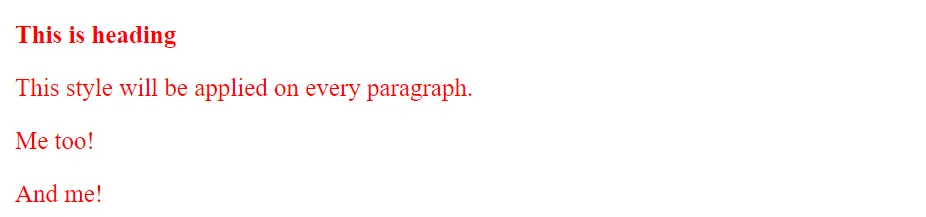
4. The CSS Universal Selector
The universal selector is used as a wildcard character. It selects all the elements on the pages.
<!DOCTYPE html>
<html>
	<head>
		<style>
			* {
			   color: green;
			   font-size: 20px;
			}
		</style>
	</head>
	<body>
		<h2>This is heading</h2>
		<p>This style will be applied on every paragraph.</p>
		<p id="para1">Me too!</p>
		<p>And me!</p>
	</body>
</html>
Output:
5. The CSS Grouping Selector
The grouping selector selects all the HTML elements with the same style definitions.
Let's see the CSS code without group selector.
h1 {
    text-align: center;
    color: red;
}
h2 {
    text-align: center;
    color: red;
}
p {
    text-align: center;
    color: red;
}
As you can see, you need to define CSS properties for all the elements. It can be grouped in following ways:
h1, h2, p {
    text-align: center;
    color: red;
}
Let's see the full example of CSS group selector:
<!DOCTYPE html>
<html>
	<head>
		<style>
			h1, h2, p {
			    text-align: center;
			    color: red;
			}
		</style>
	</head>
	<body>
		<h1>Hello World!</h1>
		<h2>Hello World! (Smaller)</h2>
		<p>This is a paragraph.</p>
	</body>
</html>
Output:

All CSS Simple Selectors
| Selector | Example | Example description |
|---|---|---|
#id |
#firstname | Selects the element with id="firstname" |
.class |
.intro | Selects all elements with class="intro" |
element.class |
p.intro | Selects only <p> elements with class="intro" |
* |
* | Selects all elements |
element |
p | Selects all <p> elements |
element,element,.. |
div, p | Selects all <div> elements and all <p> elements |