
We can apply different effects on the text used within an HTML document. Some properties can be used for adding the effects on text.
Using CSS, we can style the web documents and affects the text. The properties of the text effect help us to make the text attractive and clear.
There are some text effect properties in CSS that are listed below:
| Property | Description |
|---|---|
text-justify |
Specifies how justified text should be aligned and spaced |
text-overflow |
Specifies how overflowed content that is not displayed should be signaled to the user |
word-break |
Specifies line breaking rules for non-CJK scripts |
word-wrap |
Allows long words to be able to be broken and wrap onto the next line |
writing-mode |
Specifies whether lines of text are laid out horizontally or vertically |
CSS Text Overflow
The CSS text-overflow property specifies how overflowed content that is not displayed should be signaled to the user.
It can be clipped:

or it can be ellipsed (...):

p.example1 {
	white-space:  nowrap;
	width:  200px;
	border:  1px solid #000000;
	overflow:  hidden;
	text-overflow:  clip;
}

p.example2 {
	white-space:  nowrap;
	width:  200px;
	border:  1px solid #000000;
	overflow:  hidden;
	text-overflow:  ellipsis;
}CSS Word Wrapping
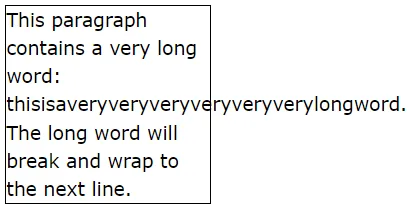
The CSS word-wrap property allows long words to be able to be broken and wrap onto the next line.
If a word is too long to fit within an area, it expands outside:
The word-wrap property allows you to force the text to wrap - even if it means splitting it in the middle of a word:
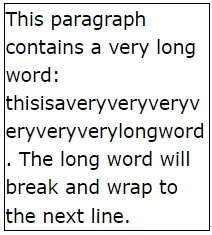
p {
	word-wrap:  break-word;
}
CSS Word Breaking
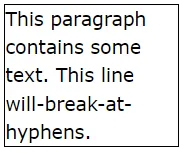
The CSS word-break property specifies line breaking rules.
p.example {
	word-break:  keep-all;
}
p.example {
	word-break:  break-all;
}
CSS Writing Mode
The CSS writing-mode property specifies whether lines of text are laid out horizontally or vertically.
The following example shows some different writing modes:
p.example1 {
	writing-mode:  horizontal-tb;
}

span.example2 {
	writing-mode:  vertical-rl;
}

p.example3 {
	writing-mode:  vertical-rl;
}